Picture this: a developer finishes building a Flask app — clean code, decent UI, everything working perfectly on localhost:5000. Friends are waiting to try it. The app gets pushed to a Cloud Server, flask run gets typed, and… it’s called done.
Two days later the app is down. Nobody can figure out why. SSH into the server and the process has just quietly died. No logs. No alerts. Nothing.
That’s the moment most developers realize they have no idea what “production deployment” actually means. They know Flask. They don’t know the machinery that’s supposed to hold it up.
This post is what should have been there from the start — a plain explanation of the stack, with enough context to understand why each piece exists.
In this post we’ll be covering following topics:
- Why the Flask dev server is not for production
- Why Gunicorn is needed
- Why Nginx sits in front
- How Docker simplifies everything
- The final setup together
The Flask dev server is lying to you
When flask run or python app.py is run, Flask starts a tiny built-in server called Werkzeug. It’s great for development — it auto-reloads when files change, shows nice error pages, and prints debug output right in the terminal. Many developers use it for months without thinking twice.
"WARNING: This is a development server. Do not use it in a production deployment." — Flask, literally every time you run it.Most developers have read that warning dozens of times and completely ignored it. Big mistake.
Here’s the thing: Werkzeug handles one request at a time. That’s fine when only one person is testing the app. But the moment two real users hit the endpoint at the same time, one of them waits. The moment a slow database query locks things up, every other request freezes. The moment the process crashes, the entire app disappears until someone manually SSH’s back in and restarts it.
It’s not built for traffic. It’s built for you, alone, at your desk.
The technical reason

Werkzeug is a single-threaded synchronous server. Flask apps are WSGI applications — they're designed to speak a standard interface (Web Server Gateway Interface) that a proper production server can call. Werkzeug implements that interface just well enough for development.
Enter Gunicorn — the real application server
Gunicorn (short for “Green Unicorn”) is what actually runs Flask code in production. Think of it like this: the Flask app is a function. Gunicorn is the engine that calls that function across multiple parallel workers so the app can handle real traffic.andle real traffic.
Installing it is simple:
Those -w 4 workers are separate OS processes. Each one can handle a request independently. If one worker gets stuck on a slow query, the other three keep going. If one crashes, Gunicorn automatically restarts it. That’s the difference between a server that limps along and one that actually behaves like a server.
The difference becomes obvious the first time someone switches from flask run to Gunicorn on a staging server and runs a simple load test. With the dev server, 10 requests at the same time turn into a queue. With Gunicorn and 4 workers, everything comes back at roughly the same time. It sounds obvious in hindsight, but seeing it makes the whole concept click.
How many workers?

A common rule of thumb is (2 × number of CPU cores) + 1. On a 2-core server, that's 5 workers. Don't go too high — each worker is a full Python process with its own memory footprint.
Why Nginx sits in front of everything
This one confused me the longest. If Gunicorn is already serving the app, why add another server in front of it?
The short answer: Gunicorn is good at running Python. Nginx is good at everything else.
Nginx is a reverse proxy — it sits at the front door of your server and decides what to do with each incoming request. It’s written in C, built to handle thousands of concurrent connections with almost no memory, and has been battle-hardened for decades.
Here’s what Nginx does that Gunicorn was never meant to handle:
Slow clients
When a client (say, someone on a spotty mobile connection) sends a request slowly, Nginx buffers the entire request before forwarding it to Gunicorn. This means a Gunicorn worker isn’t sitting idle holding a connection open waiting for a slow upload — it gets the request all at once and finishes fast. Without this, slow clients can silently exhaust your worker pool.
Static files
Serving a CSS file or a logo PNG through Python is wasteful. Nginx can serve static files directly from disk at the OS level — no Python process involved. On a busy app, this alone makes a noticeable difference.
SSL/TLS termination
Nginx handles HTTPS. Your Flask app speaks plain HTTP internally, and Nginx decrypts the incoming traffic before forwarding it. Certificates, renewal, HTTP-to-HTTPS redirects — all managed at the Nginx layer.
Load balancing and routing
One Nginx instance can route traffic across multiple Gunicorn processes, across multiple servers, or to completely different backends depending on the URL. It’s the natural place to add a second app server when you eventually need to scale.
Once this is set up properly, a few things become immediately clearer. The Flask app no longer needs to care about the client’s IP (Nginx passes it via a header). Static assets load faster. And the whole architecture makes sense as a diagram rather than a guess.
Docker ties it all together (and kills “works on my machine”)
The old way of doing this was manually installing everything on the server — Python, pip packages, Nginx config, Gunicorn config. Then one day the app needs to move to a different server. Three hours of reinstalling and debugging later, it’s clear there has to be a better way.
Docker lets you describe the entire application environment in a file. The exact Python version, the exact dependencies, the exact startup commands — all locked in and ready to go. If it works on a laptop, it works on the server. Full stop.
Here’s the setup that works well for most Flask projects:
And then the real magic: docker-compose.yml brings Flask/Gunicorn and Nginx together as two coordinated containers.
Deploying to a fresh server now takes about five minutes. Clone the repo, run docker compose up -d, and it’s live. No manual pip installs, no hunting for which config file is wrong, no “it works on my machine” conversations.
The full picture
Once all three pieces are in place, here’s how a single web request actually travels through the stack:
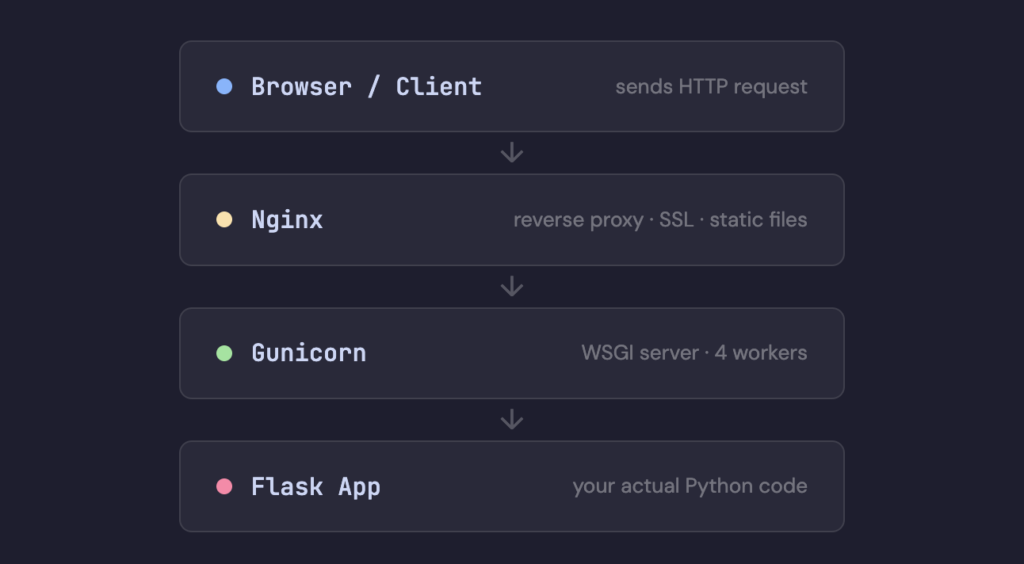
Each layer does one thing well. Nginx handles the internet-facing concerns. Gunicorn manages concurrency. Flask handles the business logic. Docker makes sure the whole thing is portable and reproducible.
It takes a while to understand why this separation exists. But once it clicks, deployment stops feeling like a chore and starts feeling like part of the craft. Every Flask app deserves infrastructure that won’t quietly die at 2am on a Tuesday.
The dev server gets you to localhost. The production stack gets you to the world.If flask run is still running on a live server somewhere — go fix that today. Future you will be grateful.
That’s the stack. Clean, battle-tested, and used by developers shipping real applications every day. But deployment is just one piece of the puzzle — there’s a lot more ground to cover. Each post follows the same idea — just the real explanation of why things work the way they do.
If any of this saved time or cleared up something that was confusing, stick around. The next one might do the same.
Leave a Reply